
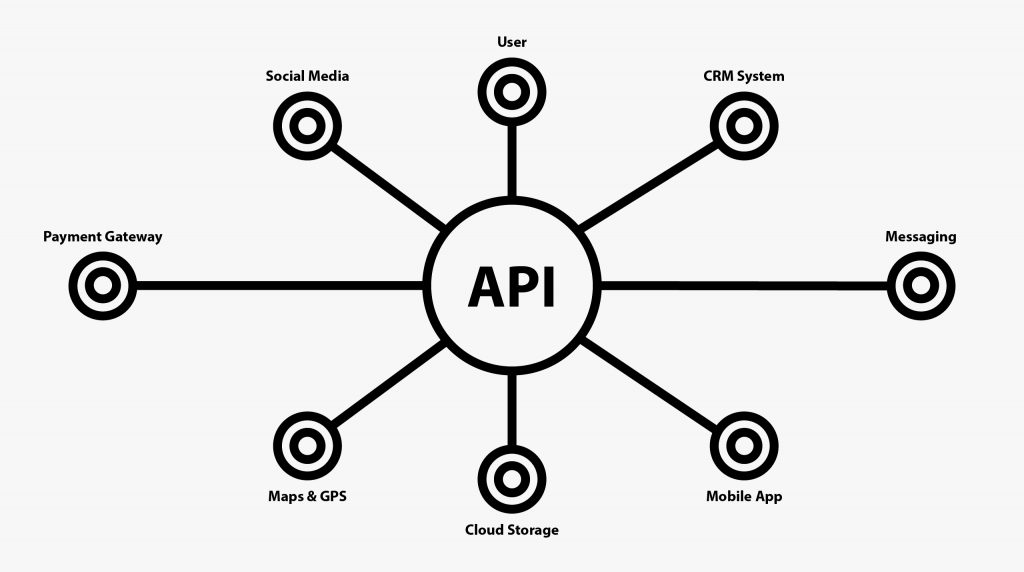
Think of the internet as a massive, bustling ecosystem. Beneath the surface of every sleek app, automated workflow, and instant online checkout lies a silent network of digital bridges making it all possible. These bridges are APIs (Application Programming Interfaces).
Whether you are booking a luxury villa rental, syncing real-world property listings, or processing a secure payment, APIs are the invisible engine powering our modern digital experiences.
What Exactly is an API?
An API, or Application Programming Interface, is a set of defined rules and protocols that allows different software applications to talk to one another and share data seamlessly.
Instead of building every single feature from scratch, developers use APIs to connect standalone pieces of software. This connectivity is what makes modern applications incredibly powerful, highly secure, and exceptionally agile.
The Evolution of APIs: 5 Definitive Eras
APIs aren’t a new phenomenon, but their role has shifted dramatically over the last few decades. We can break their evolution down into five distinct phases:
Phase 1: The Commercial Launchpad (Early 2000s)
The modern web API era kicked off with early e-commerce and digital pioneers like eBay, Salesforce, and Amazon. They realized that opening up their platforms via APIs allowed third-party vendors and partners to integrate their services directly, massively expanding their market reach.
Phase 2: The Social Connectivity Boom (Mid-2000s)
Platforms like Flickr, Facebook, and Twitter changed the game by using APIs for data sharing rather than pure monetization. When Facebook launched its initial API in 2006, it allowed external developers to integrate user profiles, photos, and events into unique apps—a strategic move that cemented Facebook’s position as a global social giant.
Phase 3: The Cloud Revolution (2006+)
Amazon shifted the tech paradigm in 2006 with the release of Amazon S3 (Simple Storage Service) and EC2 (Elastic Compute Cloud). By allowing developers to provision storage and computing power instantly via web APIs, they laid the foundation for modern cloud computing and the scalable subscription models we rely on today.
Phase 4: The Mobile First Explosion (2007+)
The arrival of iOS and Android put the internet in everyone’s pocket. This shift triggered an immense demand for mobile apps driven entirely by APIs. Companies like Twilio (telecom-as-a-service) and Instagram built their empires around an API-centric architecture to handle rapid scaling and massive user demands.
Phase 5: The Internet of Things (2010s–Present)
Today, APIs extend far beyond phones and computers. They connect smart thermostats, wearable fitness trackers, voice assistants (like Alexa), and security systems to the cloud. This continuous exchange of real-time data shapes our modern smart-home and connected-business landscapes.
How Do APIs Work? (The Request-Response Cycle)
At its core, an API operates on a straightforward loop: a Request is made, and a Response is returned.
[ API Client ]  --- (API Request) --->  [ API Server ]
[ API Client ]  <-- (API Response) ---  [ API Server ]
1. The API Client
The client is the initiator. This is the frontend software—like a website or a mobile app—where an action takes place (e.g., a user clicking “Book Now” or typing into a search bar).
2. The API Request
The client packages a request and sends it down the wire. A standard web request typically contains:
- Endpoint: The specific URL destination where the resource lives (e.g.,
/villasor/checkout). - Method: The action being requested. Standard HTTP methods include GET (retrieve data), POST (create data), PUT (update data), and DELETE (remove data).
- Parameters: Specific filters or variables (e.g., filtering a property search by
location=marbella). - Headers: Hidden metadata providing context, such as security tokens or content types.
- Body: The actual data payload being sent (e.g., the text of a new form submission).
3. The API Server
The server receives this request, checks the credentials for security, validates the input, talks to the underlying database, and processes the action.
4. The API Response
The server sends a package back to the client containing:
- Status Code: A three-digit shortcut indicating success or failure (e.g.,
200 OK,21 Created, or the dreaded404 Not Found). - Response Body: The requested data—usually delivered in a clean, highly readable format like JSON.
💡 The Restaurant Metaphor
Think of an API like dining at a restaurant. You are the Client. The kitchen is the Server where your food is prepared. The waiter is the API. You look at the menu (the API documentation), place your order with the waiter (the Request), the waiter takes it to the kitchen, and returns to your table with your food (the Response). You don’t need to know how the kitchen cooks the meal; you just need the waiter to deliver it.
Core Benefits of Utilizing APIs
- Automation: APIs handle repetitive data transfers automatically, freeing up team members from manual entry.
- Accelerated Innovation: Instead of spending months building a mapping tool or a payment gateway, developers can plug in existing public APIs to launch new features in days.
- Robust Security: APIs act as controlled gateways. They ensure only authorized, authenticated requests get access to sensitive core systems.
- Cost Efficiency: Relying on specialized third-party infrastructure avoids the massive overhead of building and maintaining custom internal software.
Classifying APIs by Access Level
Not all APIs are structured the same way. They are generally categorized into three tiers based on who can access them:
| API Type | Who Has Access? | Primary Use Case |
| Private (Internal) APIs | Only developers inside the organization. | Linking internal microservices, frontends, and databases securely. |
| Partner APIs | Specific, authorized external business allies. | B2B integrations, shared logistics, and collaborative platform ecosystems. |
| Public (Open) APIs | Any external developer or the general public. | Widely scaling software adoption, open innovation, and commercial API products (e.g., Stripe, Google Maps). |
5 Prevalent API Architectural Styles
When building an API, developers follow specific architectural frameworks. The most common styles include:
1. REST (Representational State Transfer)
The undisputed heavyweight champion of the web. REST APIs leverage lightweight JSON formatting and standard HTTP methods, making them incredibly intuitive to build, scale, and integrate across modern web apps.
2. SOAP (Simple Object Access Protocol)
An older, highly strict protocol relying on XML. While it carries more structural overhead than REST, SOAP remains a staple in enterprise corporate environments and banking systems due to its rigid, built-in security features.
3. GraphQL
A modern, open-source query language developed by Meta. Instead of hitting multiple endpoints to gather different pieces of data, GraphQL allows clients to request the exact dataset they need in a single round-trip, optimizing performance on slower mobile connections.
4. Webhooks
While traditional APIs require you to pull data manually, webhooks are “reverse APIs.” They are event-driven, meaning they push real-time data to a specific URL automatically the second an event occurs (e.g., immediately notifying a business when an online payment succeeds).
5. gRPC
A high-performance framework created by Google. It relies on Protocol Buffers rather than JSON or XML, allowing disparate distributed microservices to communicate with ultra-low latency.
Practical Business Use Cases & Real-World Examples
APIs drive real-world business growth in practical, tangible ways:
- E-Commerce & Hospitality: Platforms integrate Stripe or PayPal APIs for secure, frictionless financial checkouts, or use mapping APIs to track local deliveries.
- System Integration: Connecting a front-end website to a CRM (like Salesforce) to instantly log incoming customer inquiries.
- Scalable Architecture: Using microservices connected via private APIs so a platform can scale up its search feature independently of its payment infrastructure.
Industry Champions Leading with APIs:
- Notion: Offers a robust public API letting teams automate project tracking and build custom dashboards.
- Discord: Allows developers to craft customized bots to manage communities and automate server moderation.
- DoorDash Drive: Lets local merchants tap into their massive fleet of local drivers using on-demand logistics APIs.
Frequently Asked Questions
What is an “API-First” strategy?
It is a software design philosophy where the API is treated as the foundational building block of the product. Instead of building a website and sticking an API onto it later, developers design the API first, ensuring that web apps, mobile apps, and third-party integrations all consume the exact same high-performance core service.
What is the difference between an API and a Webhook?
An API relies on polling—your software has to repeatedly ask the server, “Is there new data yet?” A webhook relies on pushing—the server actively screams, “Hey, something just happened!” and hands over the data instantly.
How do development teams manage and build APIs?
Building an API involves designing the routes, setting up an infrastructure framework (like Node.js or Python), and running rigorous tests. To keep this orderly, teams use version control tools like GitHub, continuous deployment pipelines, and comprehensive API platforms like Postman to design, secure, and monitor their APIs as they scale.
5 Things Marbella Restaurants Need on Their Website to Double Bookings
New Tutorial: Ditching Legacy CSS Padding Hacks for Native Aspect Ratios
JavaScript (JS): Bringing Interactivity and Life to the Web
