
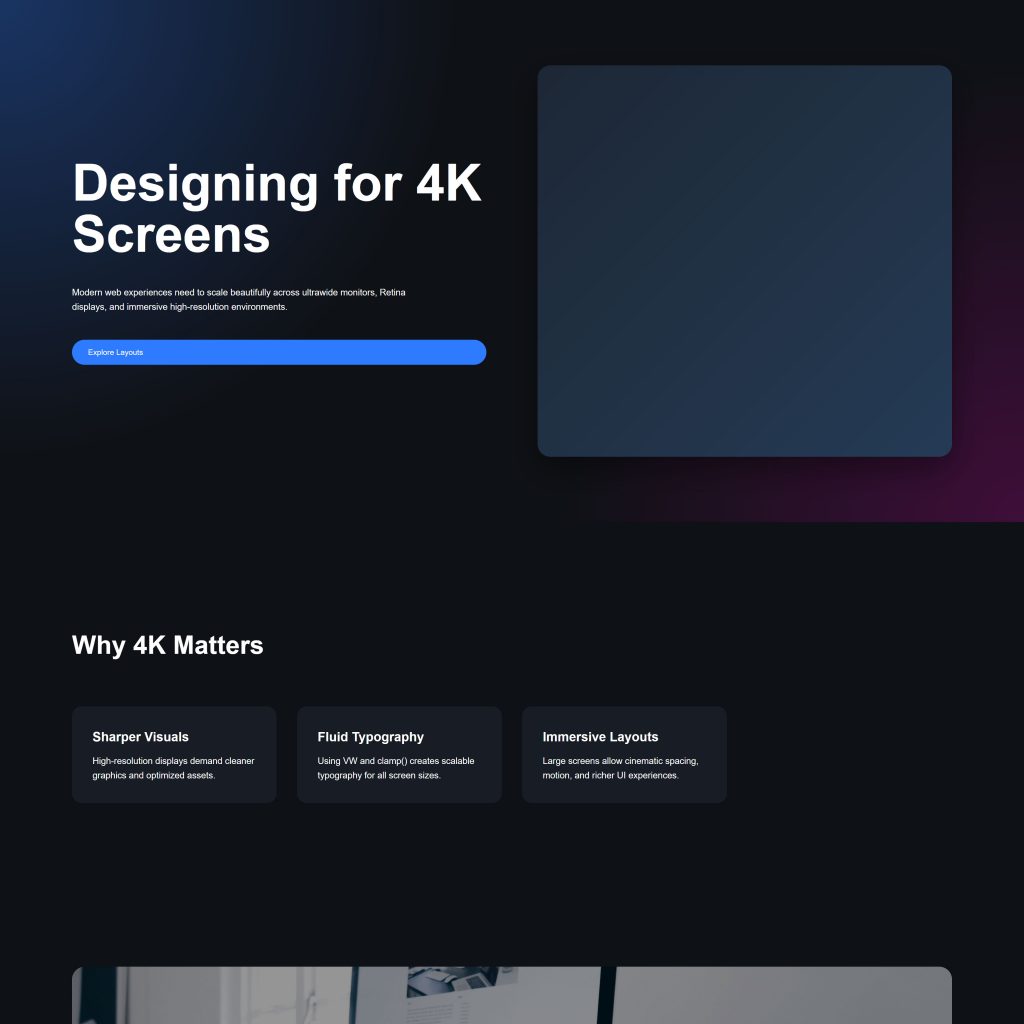
As ultra-high-resolution displays become more common in homes, offices, and public spaces, web designers are facing a new challenge: creating experiences that look stunning on 4K screens. From 27-inch monitors to 65-inch smart TVs, users are consuming digital content on larger and sharper displays than ever before.
But designing for 4K isn’t simply about making everything bigger. It’s about balancing clarity, usability, performance, and visual sophistication across a wide range of screen sizes and pixel densities.
What Is 4K Web Design?
4K refers to a display resolution of approximately 3840 × 2160 pixels — four times the resolution of Full HD (1920 × 1080). This higher pixel density allows for incredibly crisp visuals, sharper typography, and more immersive interfaces.
4K web design focuses on optimizing websites and digital interfaces for these ultra-high-definition displays while maintaining responsiveness across smaller devices.
Why 4K Matters in Modern Web Design
Large screens are no longer niche products. Remote work, gaming, creative industries, digital signage, and luxury consumer electronics have accelerated the adoption of high-resolution monitors and TVs.
This shift changes user expectations:
- Users notice blurry images immediately
- Poor spacing becomes more obvious
- Low-quality typography feels outdated
- Minimalist layouts can appear empty on huge displays
- Performance issues become more noticeable with heavy assets
Designers now need to think beyond mobile-first and embrace multi-scale experiences.
The Biggest Challenges of 4K Web Design
1. Excessive White Space
A layout that feels balanced on a laptop may look sparse and unfinished on a 32-inch 4K monitor. Large empty areas can reduce engagement and make interfaces feel disconnected.
Designers should:
- Use flexible grid systems
- Increase content density intelligently
- Introduce multi-column layouts on larger screens
- Create adaptive spacing rather than fixed spacing
The goal is to use screen real estate effectively without overwhelming the user.
2. Image Quality and Optimization
Low-resolution images quickly become pixelated on 4K displays. However, serving massive images to every user can damage load times and SEO performance.
Best practices include:
- Using responsive images with
srcset - Serving next-generation formats like WebP and AVIF
- Implementing lazy loading
- Compressing assets carefully
- Using SVGs wherever possible
Modern users expect visual sharpness without sacrificing speed.
3. Typography Scaling
Typography behaves differently on ultra-high-resolution screens. Text that appears perfect on a smaller display may look tiny or weak on a large monitor.
Effective 4K typography strategies:
- Use fluid typography with CSS clamp()
- Increase line-height for readability
- Avoid excessively thin font weights
- Test typography on multiple screen sizes
Readable typography is one of the most important aspects of premium web experiences.
4. Layout Stretching
One common mistake is allowing content containers to stretch endlessly across wide screens. Extremely long line lengths hurt readability and make websites feel unstructured.
Solutions include:
- Setting intelligent max-width values
- Using content containers
- Creating modular sections
- Employing asymmetrical layouts for visual balance
Good 4K design embraces width strategically rather than filling every pixel.
The Rise of Cinematic Interfaces
4K displays enable a more immersive style of design. Websites increasingly resemble streaming platforms, operating systems, and digital experiences rather than traditional pages.
Emerging trends include:
- Full-screen video backgrounds
- Large immersive hero sections
- Subtle motion design
- Layered depth effects
- Glassmorphism and soft shadows
- High-resolution interactive visuals
However, visual sophistication should never come at the expense of usability or performance.
Performance Is More Important Than Ever
4K experiences often require larger assets, more animations, and richer interfaces. Without optimization, websites can become painfully slow.
Performance strategies include:
- Code splitting
- Image optimization pipelines
- CDN delivery
- Hardware-accelerated animations
- Efficient caching
- Reducing unnecessary JavaScript
A fast website on a 4K display feels premium. A slow one feels broken.
Responsive Design Is Evolving
Traditional responsive design focused mainly on mobile, tablet, and desktop breakpoints. Today, designers must also consider:
- Ultrawide monitors
- Retina displays
- 5K and 8K screens
- Smart TVs
- Interactive kiosks
- Large conference displays
Modern responsive design is becoming experience-responsive rather than device-responsive.
Designing for the Future
4K adoption is likely just the beginning. As higher-resolution displays become standard, users will continue expecting cleaner visuals, smoother interactions, and more immersive digital experiences.
The future of web design will reward teams that:
- Design flexibly
- Prioritize scalability
- Optimize relentlessly
- Think beyond traditional screen sizes
The best 4K websites don’t just look sharper — they feel more refined, intentional, and immersive.
Final Thoughts
4K web design represents a major evolution in digital experience design. Large high-resolution screens expose weak layouts, poor imagery, and outdated interfaces, but they also create opportunities for more cinematic and visually impressive experiences.
Designers who embrace scalable systems, responsive thinking, and performance-first development will be best positioned for the next generation of the web.
As screens continue getting bigger and sharper, thoughtful design becomes more important — not less.
Code Example
<!DOCTYPE html>
<html lang="en">
<head>
<meta charset="UTF-8" />
<meta name="viewport" content="width=device-width, initial-scale=1.0" />
<title>4K Web Design Layout by WeDesignMarbella.com</title>

<style>

/* =========================
   RESET
========================= */

*{
    margin:0;
    padding:0;
    box-sizing:border-box;
}

body{
    font-family:Arial, sans-serif;
    background:#0f1115;
    color:#ffffff;
    line-height:1.6;
    overflow-x:hidden;
}

/* =========================
   FLUID TYPOGRAPHY
========================= */

h1{
    font-size:clamp(3rem, 6vw, 8rem);
    line-height:1;
    margin-bottom:2rem;
}

h2{
    font-size:clamp(2rem, 3vw, 4rem);
    margin-bottom:1.5rem;
}

p{
    font-size:clamp(1rem, 1.2vw, 1.4rem);
    max-width:70ch;
}

/* =========================
   MAIN CONTAINER
========================= */

.container{
    width:min(90vw, 1800px);
    margin:auto;
}

/* =========================
   HERO SECTION
========================= */

.hero{
    min-height:100vh;
    display:flex;
    align-items:center;
    position:relative;
    overflow:hidden;
    padding:6vw 0;
}

.hero::before{
    content:"";
    position:absolute;
    inset:0;
    background:
        radial-gradient(circle at top left, #2f7bff55, transparent 40%),
        radial-gradient(circle at bottom right, #ff00cc33, transparent 40%);
    z-index:0;
}

.hero-content{
    position:relative;
    z-index:2;
    width:100%;
    display:grid;
    grid-template-columns:1fr 1fr;
    gap:5vw;
    align-items:center;
}

.hero-text{
    display:flex;
    flex-direction:column;
    gap:2rem;
}

.hero-image{
    height:70vh;
    border-radius:2rem;
    background:
        linear-gradient(135deg, #1d2735, #243b55);
    box-shadow:
        0 30px 80px rgba(0,0,0,0.4);
}

/* =========================
   FEATURES GRID
========================= */

.features{
    padding:10vw 0;
}

.grid{
    display:grid;
    grid-template-columns:repeat(3, 1fr);
    gap:2vw;
    margin-top:4vw;
}

.card{
    background:#181d26;
    padding:2vw;
    border-radius:1.5rem;
    transition:0.3s ease;
}

.card:hover{
    transform:translateY(-10px);
    background:#202734;
}

.card h3{
    font-size:clamp(1.4rem, 1.6vw, 2rem);
    margin-bottom:1rem;
}

.card p{
    max-width:none;
}

/* =========================
   FULL WIDTH SHOWCASE
========================= */

.showcase{
    height:80vh;
    margin:6vw 0;
    border-radius:2rem;
    background:
        linear-gradient(rgba(0,0,0,0.4), rgba(0,0,0,0.4)),
        url('https://images.unsplash.com/photo-1498050108023-c5249f4df085')
        center/cover no-repeat;
    display:flex;
    align-items:flex-end;
    padding:4vw;
}

/* =========================
   CTA SECTION
========================= */

.cta{
    padding:10vw 0;
    text-align:center;
}

.button{
    display:inline-block;
    margin-top:2rem;
    padding:1rem 2.5rem;
    font-size:clamp(1rem, 1vw, 1.2rem);
    border-radius:100px;
    background:#2f7bff;
    color:#fff;
    text-decoration:none;
    transition:0.3s ease;
}

.button:hover{
    background:#5596ff;
}

/* =========================
   4K / ULTRAWIDE OPTIMIZATION
========================= */

@media (min-width:2560px){

    .container{
        width:min(88vw, 2200px);
    }

    .grid{
        grid-template-columns:repeat(4, 1fr);
    }

    .hero-image{
        height:75vh;
    }

}

/* =========================
   LAPTOP
========================= */

@media (max-width:1200px){

    .hero-content{
        grid-template-columns:1fr;
    }

    .hero-image{
        height:50vh;
    }

    .grid{
        grid-template-columns:repeat(2, 1fr);
    }

}

/* =========================
   TABLET
========================= */

@media (max-width:768px){

    .grid{
        grid-template-columns:1fr;
    }

    .hero{
        padding:20vw 0;
    }

    .showcase{
        height:50vh;
    }

}

/* =========================
   MOBILE
========================= */

@media (max-width:480px){

    h1{
        font-size:3rem;
    }

    h2{
        font-size:2rem;
    }

    p{
        font-size:1rem;
    }

    .container{
        width:92vw;
    }

}

</style>
</head>

<body>

<!-- HERO -->

<section class="hero">

    <div class="container hero-content">

        <div class="hero-text">
            <h1>Designing for 4K Screens</h1>

            <p>
                Modern web experiences need to scale beautifully
                across ultrawide monitors, Retina displays,
                and immersive high-resolution environments.
            </p>

            <a href="#" class="button">Explore Layouts</a>
        </div>

        <div class="hero-image"></div>

    </div>

</section>

<!-- FEATURES -->

<section class="features">

    <div class="container">

        <h2>Why 4K Matters</h2>

        <div class="grid">

            <div class="card">
                <h3>Sharper Visuals</h3>
                <p>
                    High-resolution displays demand
                    cleaner graphics and optimized assets.
                </p>
            </div>

            <div class="card">
                <h3>Fluid Typography</h3>
                <p>
                    Using VW and clamp() creates scalable
                    typography for all screen sizes.
                </p>
            </div>

            <div class="card">
                <h3>Immersive Layouts</h3>
                <p>
                    Large screens allow cinematic spacing,
                    motion, and richer UI experiences.
                </p>
            </div>

        </div>

    </div>

</section>

<!-- SHOWCASE -->

<section class="container">

    <div class="showcase">

        <div>
            <h2>Built for Ultrawide Displays</h2>
            <p>
                Responsive systems should adapt intelligently
                from mobile devices to 4K workstations.
            </p>
        </div>

    </div>

</section>

<!-- CTA -->

<section class="cta">

    <div class="container">

        <h2>Create Next-Gen Interfaces</h2>

        <p>
            Build scalable, cinematic experiences that feel
            premium on every display size.
        </p>

        <a href="#" class="button">
            Start Designing
        </a>

    </div>

</section>

</body>
</html>
TV Art: 4K Screensaver | 67 Paintings Art TV Wallpaper
